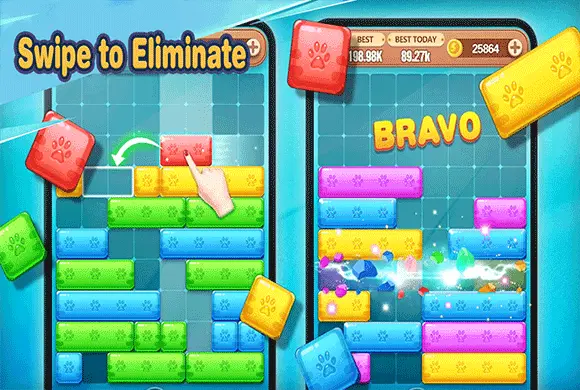
Swipe To Eliminate: slide within the row to close its gap
The puzzle works with the rows already on the board. You reposition blocks horizontally rather than placing a new shape from outside the grid, so each gap needs a block that can reach it along that row.
Controls
Tap and Hold: Select a block. Swipe Left/Right: Move the selected block horizontally within its row.
Slide within the row to close its gap
Starting your puzzle journey in Swipe To Eliminate is intuitive and easy to pick up. When you begin a level, you will see a grid with several rows of colored blocks already at the bottom. Your primary goal is to reach a specific target score to advance to the next stage. To play, look for gaps in the existing rows. Tap and hold a block, then swipe it left or right along its row. Your aim is to move blocks into these empty spaces to form a solid, unbroken line across the entire grid.
The moment a row is complete, it will be eliminated, and you will earn points. After each move you make (or after a certain amount of time), a new row of blocks will rise from the bottom of the screen. You must work quickly and efficiently; if the blocks stack up and reach the very top of the grid, the game is over! Keep an eye on the "Combo" meter to maximize your score by clearing rows back-to-back.
Plan your swipes carefully to ensure you always have a way to clear the board!
Strategic Sliding Mechanics
Master the art of horizontal swiping to position blocks perfectly and complete rows.
Dynamic Grid Gameplay
Adapt to new blocks constantly rising from the bottom, adding urgency and challenge to every move.
Complete rows and build score without letting blocks reach the upper boundary
Look for a gap that matches the width of a movable block before swiping. Consider whether one completed row will set up another, while keeping the stack height in view.
A block in another row cannot be dragged upward or downward to fill the gap.
This guide is based on the supplied game instructions.
Questions about Swipe To Eliminate
How do I trigger a combo?
Clear two or more rows with a single move, or clear rows in very quick succession to start and maintain a combo multiplier.
What happens if the blocks reach the top?
If any part of the block stack reaches the top edge of the grid, it's "Game Over," and you will need to restart the level.
Can I move blocks vertically?
No, blocks can only be moved horizontally within the row they currently occupy.
Something not working?
Tell us the game name, your device and what happened at mia@minigame.xin.