Fingertip Piano: read the next lane while finishing the current note
Fingertip Piano turns the song into a stream of visible lane targets. The black tiles tell you where to act; the target area tells you when. Missing a tile or tapping a white space ends the attempt, so accurate placement matters as much as keeping up with the rhythm.
Controls
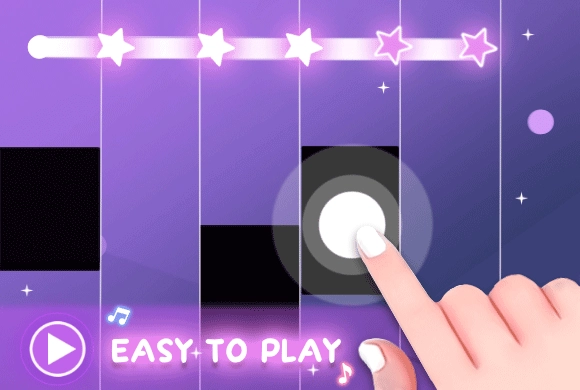
Tap the black tiles as they fall down. Do not tap the white background or miss any tiles.
Read the next lane while finishing the current note
In Fingertip Piano, your journey starts at the song selection menu. Browse through the available tracks and tap "Start" to begin your performance. Once the music kicks in, four vertical lanes will appear on the screen. Black tiles will start falling from the top, aligned perfectly with the rhythm of the melody. Your task is to tap each black tile as it passes through the target area at the bottom. Accuracy is key—tapping exactly on the beat grants you a "Perfect" score and builds your combo multiplier.
Be extremely careful: if you tap a white space or let a black tile fall past the bottom edge, the music stops and the game is over. Some levels feature long tiles that require you to hold your finger down until the tile ends. Collect as many stars as possible to unlock new, faster songs and prove your mastery over the keys!
Dynamic Song Library
Enjoy a wide variety of classical and contemporary piano tracks.
Escalating Difficulty and Star Mastery System
Speed increases as you play, providing a true test for your reflexes.
Earn up to five stars on every song by achieving high scores.
Follow the song's black tiles without missing one or tapping empty white space
Keep your attention slightly above the target area so the next tile is visible before it needs an input. Treat a long tile as one sustained action rather than several short taps. When a pattern speeds up, keep aiming inside the black tiles instead of tapping broad areas of the screen.
The white background is not a safe extra tap area. Releasing a long tile immediately treats a sustained note like a short one.
This guide is based on the supplied game instructions.
Questions about Fingertip Piano
Why does the game end suddenly?
You likely missed a black tile or tapped the empty white area.
How can I unlock Song 3 and beyond?
Reach high scores in previous songs or earn enough stars to unlock them.
Something not working?
Tell us the game name, your device and what happened at mia@minigame.xin.