Musicat: choose between making music and following a challenge
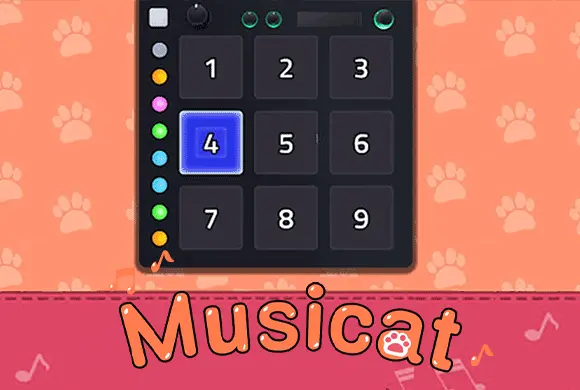
Musicat offers two distinct starting points. Instrument mode lets you choose an instrument and play its keys; challenge mode adds falling indicators and timing. Learning the numbered layout in free play can make a later challenge easier to read without confusing exploration with a scored song.
Controls
Tap: Click or tap on the numbered keys, drums, or grid squares to play notes or hit rhythm targets.
Choose between making music and following a challenge
Getting started with Musicat is simple and fun! Free Play (Instrument Mode): Select your preferred instrument from the tab at the bottom, such as the piano or drums. You can then tap on the numbered keys or pads on the screen to play your own melodies. The "Page" tab even provides basic guides for famous tunes like "Twinkle, Twinkle, Little Star" or "Happy Birthday" if you want to practice!
If you're looking for a test of skill, tap the "Play" button on a specific song level. When the stage loads, you will see a grid of numbered squares. Indicators will drop down, and your goal is to tap the corresponding number on the grid exactly as it aligns with the beat. Successful taps build up your "Combo" meter. The goal is to finish the song with a high combo and earn 3 stars for a "Perfect!"
rating. Collect enough coins and gems to unlock higher-level songs and new "Items" like custom backgrounds (e.g., "Night Sky") or new cat avatars (e.g., "Adam"). Keep practicing, improve your timing, and you'll be a feline maestro in no time!
Multiple Virtual Instruments
Switch between piano, drums, and other fun instruments to create different sounds.
Rhythm Challenge Mode and Unlockable Content
Follow the falling notes and tap the screen to the beat to clear challenging song stages.
Collect rewards to unlock new songs, musical instruments, and cute character skins.
In instrument mode, play the notes you choose; in challenge mode, follow the indicated panels through the song as accurately as possible
Use free play to learn the position of the numbered panels before focusing on speed. In a challenge, read the next panel number as well as the timing of the current cue. Try a short repeated pattern on one instrument before switching sounds, so the key layout becomes familiar.
Free play does not use the same objective as a timed challenge. A correctly timed tap still needs to land on the indicated panel.
This guide is based on the supplied game instructions.
Questions about Musicat
How do I play songs like "Twinkle Twinkle Little Star"?
Tap on the "Page" tab while in the instrument mode to find the numeric sequence for famous songs, then tap those numbers on your virtual instrument.
Why are some instruments locked?
Some premium or advanced instruments require unlocking through gameplay milestones or by using the currency you earn while playing.
Something not working?
Tell us the game name, your device and what happened at mia@minigame.xin.