Small Wardrobe: leave room for the next fabric stack
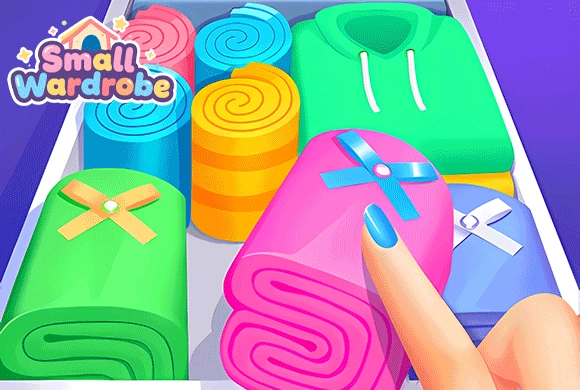
The wardrobe is built through a placement puzzle: available space matters as much as the color of each stack. Matching neighbors clears fabrics, while scattered unmatched stacks can leave no place for the next piece.
Controls
Drag & Drop: Touch, hold, and drag the fabric stacks to place them on the puzzle grid. Tap/Click: Tap to navigate menus, select clothing categories, equip items, and use boosters.
Leave room for the next fabric stack
Playing Small Wardrobe requires both logical thinking and fashion sense.
The Sorting Puzzle. To earn new clothes, enter the puzzle mode. You will see a diamond-shaped grid and a "waiting area" at the bottom with stacks of folded fabrics.
Drag and Match. Tap and drag a fabric stack from the waiting area onto an empty grid tile. If you place it adjacent to another stack of the exact same color/fabric, they will merge and clear from the board.
Clear the Grid. Your goal is to keep clearing fabrics to meet the level requirements. Be careful not to fill up the entire grid with unmatched colors, or you will get stuck! Use bottom boosters like "Bomb" or "Refresh" if you need help.
Unlock the Wardrobe. Clearing puzzles rewards you with new clothing items. Tap the wardrobe icon to reveal the blind boxes you've earned and add them to your collection.
Dress Up! Go to the main menu and enter the "Dress Up" section. Here, you can mix and match all your unlocked items. Change your avatar's hair, eyes, clothes, and add cute accessories like a halo or cat ears. Tap "Save" to keep your favorite look!
Creative Sorting Puzzle
Drag and match stacks of identical fabrics on the grid to clear space and collect rewards.
Massive Clothing Collection and Cute Chibi Avatar
Unlock hundreds of items including tops, bottoms, shoes, hairstyles, and cute facial expressions.
Customize your adorable 2D character with endless aesthetic and pastel fashion combinations.
Use handy tools like Swap, Refresh, and Bomb to overcome tricky and crowded puzzle boards.
Meet the fabric puzzle requirements and use unlocked items to assemble an outfit
Place a stack beside an identical fabric where possible, keeping another empty space available for the next placement. Check the wardrobe after completing puzzles, then save a finished outfit from the dressing room.
Filling every cell with unmatched stacks can leave the board stuck.
This guide is based on the supplied game instructions.
Questions about Small Wardrobe
What happens if the grid fills up and I can't place any more fabrics?
If the grid is completely full and no adjacent stacks can merge, you will be stuck. You must use boosters like the "Bomb" to clear space, "Mandatory swap" to rearrange, or you will fail the level.
How do I get more specific clothes, like a new dress?
Clothes are unlocked by completing puzzle levels and opening the wardrobe blind boxes. Keep playing the sorting minigame to collect more pieces and unlock a wider variety of outfits.
Can I save the outfits I created?
Yes! Once you are happy with how your character looks in the dressing room, tap the "Save" icon (floppy disk) on the left side of the screen to lock in your design.
Something not working?
Tell us the game name, your device and what happened at mia@minigame.xin.